Diary & Job Scheduling
The Checker diary is where jobs land, engineers get sent and the day runs itself. Drag a job onto tomorrow, pick an engineer, and the customer gets a “we’re on our way” text without you lifting a finger. When you’re done, the invoice and cert file themselves against the booking.
Start your free trial →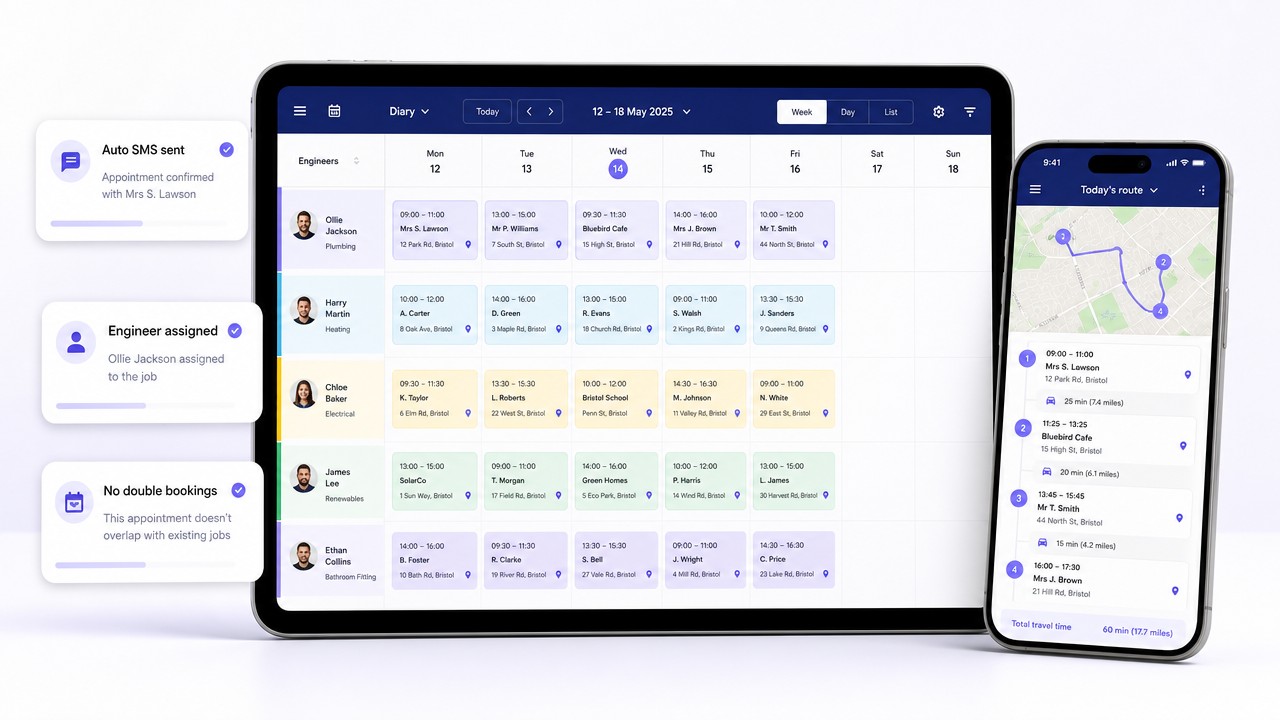
Every trades business lives or dies by the diary. Miss an appointment, double-book two customers on the same Tuesday morning, forget which engineer’s got the van keys – and suddenly you’re stood in a driveway on the phone to head office instead of doing the job.
Checker gives you a proper trades diary: day, week and month views, colour-coded per engineer, drag-and-drop rescheduling, and every appointment tied straight to the customer record. Book from a quote, from an automated service reminder, or straight from the customer’s file. The diary is the single source of truth for the whole team.
Why engineers love it
Pick a slot, pick an engineer, pick the customer. That’s it. Checker sends the “you’re booked in” text, adds it to the engineer’s phone, and shows travel time between jobs so you’re not sending someone from Leeds to Halifax to Leeds and back again.
What’s on a booking
Every appointment is a proper job card – not just a name and a postcode – so nobody rings the office asking “what am I actually doing here?”
Full address, gate code, “dog in kitchen”, tap-to-call and tap-to-navigate.
Annual service, breakdown, new install – with the boiler make and model already on the card.
Slot length per job type so the diary doesn’t cram three boiler swaps into one afternoon.
One tap to reassign. The engineer sees it on their phone straight away.
Quote, cert template and invoice all wired to the booking – open the job, fill the form, done.
Booked, on the way, on site, complete. Office sees it live, no ring-round needed.
Why engineers switch
Every engineer’s diary is on the same screen. If Dave’s already got a 10am, you can see it before you offer the slot to a customer – not after.
Checker fires a booking confirmation the moment you drop them in the diary, and a reminder the night before. “I forgot you were coming” drops off a cliff.
Drag jobs around to build a sensible route instead of criss-crossing town. Most engineers find room for one extra callout a week – that’s a boiler service pure profit.
When the engineer taps “on site” the diary updates in real time. Anyone in the office can answer “where’s Dave?” without picking up the phone.
How jobs land in the diary
Running a team
Toggle to the team view and each engineer gets their own colour column. Drag jobs between engineers to balance the day. See who’s flat-out, who’s got a gap, and who’s on holiday next Thursday. Engineers only see their own column on their phone – less clutter, less confusion.
Calendar sync
Every engineer’s Checker diary can two-way sync with their personal calendar, so their partner’s Sunday roast stays in the diary next to Monday’s boiler service. Book once, it’s on every device.
Getting started
FAQ
Yes. The diary works on iPhone, iPad and Android, plus any web browser. Book on the tablet in the office, and the engineer sees it on their phone in the van instantly.
Yes. If a slot’s taken you’ll see it before you drop a second job on top. You can override if you know what you’re doing, but Checker will warn you first.
Yes. Booking confirmation on the way in, reminder the night before, “on the way” when the engineer sets off. All optional, all editable.
Yes. Two-way sync with Google, Apple and Outlook calendars per engineer. Personal appointments show up in Checker so you don’t book on top of them.
The engineer marks it complete, the invoice fires (if you want it to), the cert files itself against the customer, and the next service reminder gets queued up a year out. That’s the whole loop, hands-free.
Free trial, no card needed. Book your first job in under a minute and see the whole week at a glance.
Start your free trial →Quick question? Mon to Fri, 9am to 5pm.
Chat on WhatsAppGet the app
Rather someone walked you through it? Book 15 minutes.
