Customer Database
Stop scrolling through your call log and rooting through the glovebox. Checker’s built-in customer database keeps every homeowner, landlord and letting agent you’ve ever worked for, with every job, quote and invoice, and every gas cert filed neatly against their name.
Start your free trial →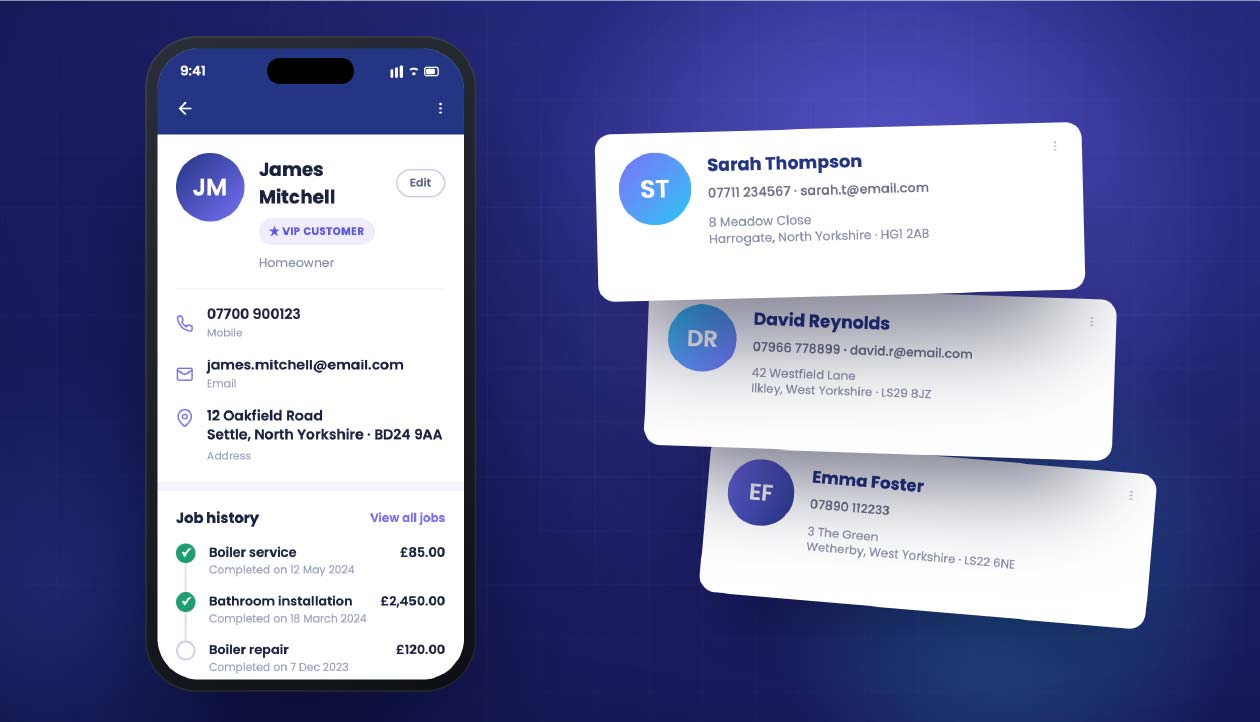
Most tradesmen’s “customer database” is a mix of contacts on the phone, a few names scribbled in a diary, a shoebox of receipts and a memory that’s getting shorter every year. It works, just about, until Mrs Jenkins in Ilkley rings up asking for a copy of her gas cert from 2022 and you’ve got no clue where it is.
Checker puts every customer in one place. Their address, phone, email, every job you’ve ever done for them, every quote and invoice, every cert filed against the property, and every reminder queued up. Search by name, postcode, boiler serial or job type – find it in seconds, not minutes.
Why engineers love it
Open a customer, and everything’s there. Last three jobs, next service due, boiler model, warranty end date, whether they paid on time or you had to chase. No more flicking between apps, no more “hang on love, let me just pull it up”.
What’s on the customer file
Each customer record holds the full picture – no bouncing between apps, spreadsheets and paper files.
Name, address, mobile, landline, email – with one tap to call or message.
Landlords with a portfolio? Store every property under one customer.
Every visit, dated and priced, with notes on what you did and what needs doing next.
Boiler make, model, serial, install date, warranty end – ready to hand.
Every CP12, EICR, OFTEC cert and job sheet stored against the property.
Financials filed alongside jobs, with clear paid/unpaid status.
Next service due, MOT-style. Auto-emails the customer when it’s time to book.
“Dog in the kitchen”, “key under the pot”, “pays cash” – whatever you need to remember.
Why engineers switch
Type a name, postcode or a bit of an address and Checker pulls up the customer, the property, every job you’ve done and every cert on file. No more digging through the van for last year’s paperwork.
Set a service reminder when you finish the job. A year later Checker emails the customer, they click to book, and the diary slot’s yours before your competitor even remembers they exist.
Customer rings up asking what boiler they’ve got. You tell them the make, model and serial before they’ve finished the question. That’s the difference between “some bloke in a van” and a business.
Take on an apprentice or a second engineer and the whole customer book stays with the business, not in someone’s head or on their personal phone. Proper handover, proper records.
Got customers already?
Import your contacts from a spreadsheet, from your phone, or from Xero, QuickBooks or Sage. Checker matches duplicates for you, so Mrs Jenkins doesn’t end up in there three times with three different phone numbers.
Kept safe
Your customer list is stored on UK/EU servers, encrypted, backed up every night, and only visible to you and the engineers you invite. If a customer asks for a data copy or asks to be forgotten, you can handle it in two clicks.
Getting started
FAQ
Yes. Bring them in from a CSV, from your phone contacts, or from Xero, QuickBooks or Sage. Checker spots duplicates so you don’t end up with the same customer three times over.
Yes. Store one customer with as many properties as they own. Each property has its own appliance list, cert history and service reminders, all filed under the same landlord.
Yes. Data lives on UK/EU servers, encrypted at rest and in transit, backed up nightly. You control who on your team can see what.
Yes. Invite your team and everyone works from the same customer book. Any job any engineer does is filed against the right customer automatically.
They’re your customers, not ours. Export the lot to CSV any time, with every job, cert and invoice attached.
Free trial, no card needed. Import your contacts in a minute and never lose a customer detail again.
Start your free trial →Quick question? Mon to Fri, 9am to 5pm.
Chat on WhatsAppGet the app
Rather someone walked you through it? Book 15 minutes.