
Best Invoicing Apps for UK Tradespeople: Which Type Fits Your Job-to-Payment Workflow? (2026)
The best invoicing app depends on where your job details live. Compare an invoice-only tool, an accounting package and a trade job app using one real quote-to-payment test before committing.

Updated 2 October 2026
Direct answer: The best invoicing app for a UK tradesperson is the one that carries the right details from the job into the bill, then makes payment and record keeping easy to check. An invoice-only tool, an accounting package and a trade job app solve different parts of that journey. Test the handoffs before comparing feature lists.
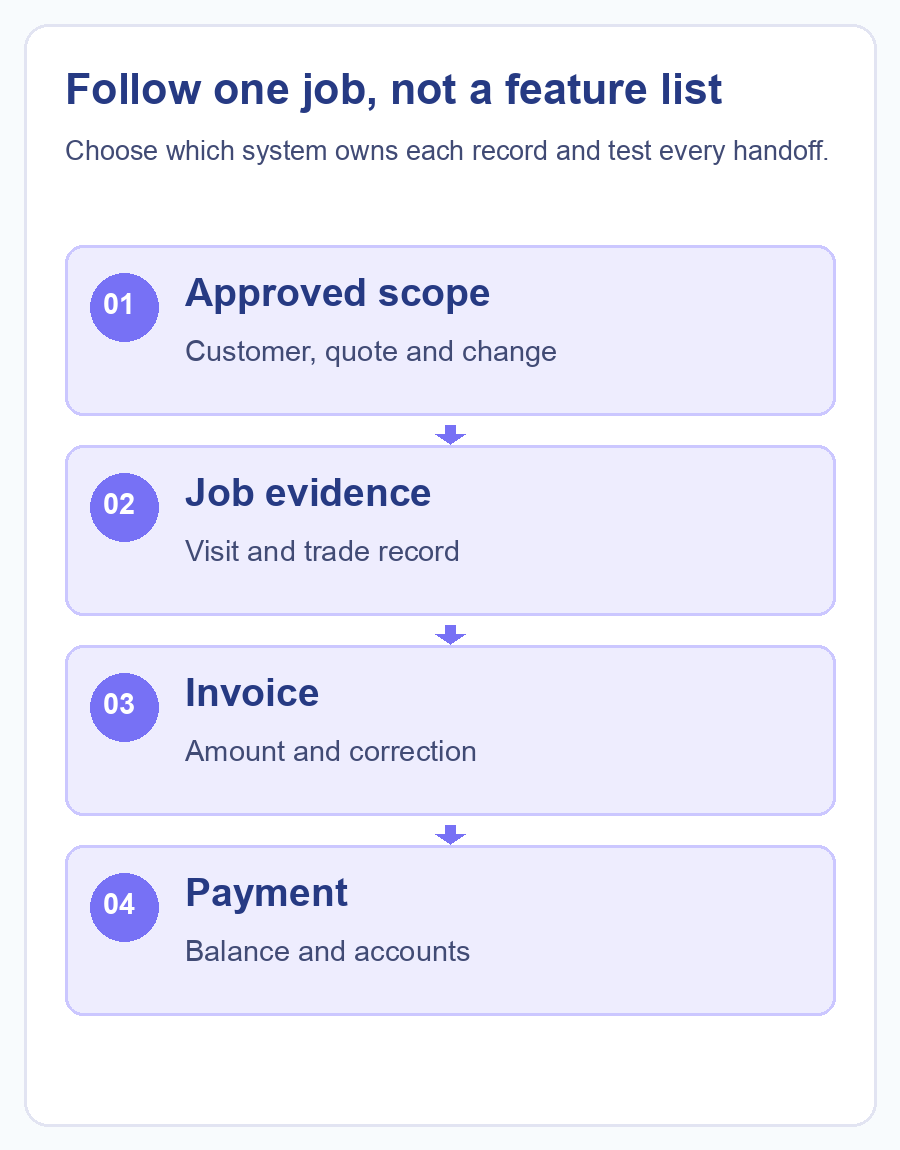
A customer does not see the software categories. They see whether the agreed work, an extra visit and the final amount appear on a clear invoice. The person doing the work needs a record they can find again; the office needs to know what is unpaid; the accountant needs the right transaction. Start with that single job, not with a top-ten list. Late payment costs UK small businesses an estimated £11 billion a year, so a clean handoff between job, invoice and payment is not just tidiness.
Which kind of invoicing app do you actually need?
An invoice-only app is a sensible starting point if your jobs and customer records already live somewhere reliable and the main gap is making, sending and chasing invoices. Zoho Invoice’s UK page describes quotes, invoices and payment reminders. That describes the billing layer; it does not establish that a separate job, report or certificate record will follow the invoice automatically. Zoho Invoice’s UK pricing page lists the plan as free, capped at two users, three projects and 500 invoices a year. Zoho, the parent company, holds a 3.9-out-of-5 rating from 6,138 Trustpilot reviews as of 30 September 2026; that figure covers Zoho’s software generally, not Zoho Invoice specifically, since no Zoho Invoice-only Trustpilot listing exists.
An accounting package is a better centre of gravity when the question is how invoices, payments and accounts reconcile. Xero’s UK invoice app page describes quote-to-invoice conversion, unpaid-invoice tracking and online payment options. If a field team uses another app for job details, ask precisely which fields sync, when they sync and who resolves a mismatch. An accounting record is not, by itself, proof of what happened at a customer’s property. Xero’s entry-level Ignite plan is £18 a month excluding VAT once its introductory discount ends, and it holds a 4.1-out-of-5 rating from 11,379 Trustpilot reviews as of 30 September 2026.
A trade job app becomes useful when a quote, visit, field record and invoice should stay connected. Checker’s quotes and invoices guide describes creating them from a job and carrying accepted quote details into an invoice. A gas or electrical business should additionally test its specific report or certificate path. That is a workflow question, not a reason to assume every invoicing feature is in every subscription plan.
| Product class | Good first question | What to demonstrate | Handoff to inspect |
|---|---|---|---|
 Invoice-only, illustrated by Zoho Invoice Invoice-only, illustrated by Zoho Invoice |
Do we mainly need to send and chase bills? | Turn an approved quote into an invoice, then record a part payment and a correction. | How the invoice relates to the job record and accounts. |
 Trade job app, illustrated by Checker Trade job app, illustrated by Checker |
Do the visit, trade record, quote and bill need one traceable job? | Complete a job, approve a change, create the invoice and find the original record again. | What moves to the accounting package and how duplicates are prevented. |
 Accounting-led, illustrated by Xero Accounting-led, illustrated by Xero |
Do our books and payment status need one home? | Match an invoice, payment and adjustment to the right customer and period. | How field details and evidence arrive from the job app. |
Product class: Invoice-only, illustrated by Zoho Invoice
Good first question: Do we mainly need to send and chase bills?
What to demonstrate: Turn an approved quote into an invoice, then record a part payment and a correction.
Handoff to inspect: How the invoice relates to the job record and accounts.
Product class: Trade job app, illustrated by Checker
Good first question: Do the visit, trade record, quote and bill need one traceable job?
What to demonstrate: Complete a job, approve a change, create the invoice and find the original record again.
Handoff to inspect: What moves to the accounting package and how duplicates are prevented.
Product class: Accounting-led, illustrated by Xero
Good first question: Do our books and payment status need one home?
What to demonstrate: Match an invoice, payment and adjustment to the right customer and period.
Handoff to inspect: How field details and evidence arrive from the job app.
This table compares the role of each type, not an overall winner. A business can use more than one type if the handoffs are controlled. It should be able to say which system owns the job, which owns the customer-facing invoice and which owns the final accounts entry.

What does a fair one-job test look like?
Pick a recent job with an initial quote and one change, such as an extra part or a second visit. Remove the real customer’s personal details for the demo. Give each vendor the same starting facts: customer, address, agreed scope, VAT treatment, quoted amount and who can approve a change. Use your actual trade record type, such as a gas report or the appropriate electrical certificate, where it applies.
Ask the demonstrator to show the following in sequence:
- Save the quote against the job and show its version or approval evidence.
- Add the agreed change without silently overwriting the first scope.
- Create the invoice and point to the source of each amount and description.
- Record a part payment, then show what remains due and what the accounts team sees.
- Correct an error and show the audit trail, rather than deleting the old record from view.
- Find the job record, invoice and payment again by customer and by job reference.
A vendor that can make a handsome invoice but cannot explain the return path may still be right for a business with a separate, disciplined job system. A vendor that links every stage may save retyping, but only if its permissions, accounting handoff and plan fit the team. Ask to see both the normal route and the exception.
For UK VAT records, HMRC’s record-keeping guidance explains the obligation to retain issued invoices and relevant credit and debit notes. GOV.UK’s invoicing guidance sets out what every UK invoice must show: a unique number, both parties’ details, a description of the work, the supply and invoice dates, and the amount charged. Use your accountant’s advice for your own VAT or CIS treatment. The software demo should show where the records live and how they can be retrieved; a product label such as “VAT ready” is not enough evidence.

Where do trade-specific records change the answer?
An invoice says what was billed. A gas report, Electrical Installation Certificate, Minor Electrical Installation Works Certificate or Electrical Installation Condition Report records a different part of the work. Where those records matter to your business, test whether the app helps the right person create and retrieve the right document and whether the customer receives the right copy. Do not let a billing screen stand in for a completed inspection or report.
That is why a plumbing or general maintenance business may select a different combination from a gas and electrical business even when both send similar invoices. The buyer question is not just “Can it issue a PDF?” It is “Can the team find the job evidence behind this amount six months later?”
If Xero is already part of your accounts, inspect the existing Checker Xero integration description as a specific example of a job-app-to-accounts handoff. Confirm the current plan, direction of sync and exception behaviour during your own demo. Never infer that a payment recorded in one system has automatically settled every other copy.
How should a small trade business make the decision?
Write down the system of record for five items: the customer, the job, the approved scope, the invoice and the payment. Then run the one-job test in the tools you already use and in one shortlisted alternative. Note each retyped field, delayed update and decision that only one person in the office understands. That short list is more useful than a feature total.
An invoice-only app may be enough if the job record is already sound. An accounting package may be the necessary anchor if the books are the pain point. A trade job app is worth a close look if the handoff from quote to field record to invoice is breaking. The right answer is the smallest combination that makes your real job auditable without creating a second, contradictory version of the bill.
Put a rough monthly figure on it for a sole trader adding one office colleague. Zoho Invoice’s free plan covers billing only, capped at two users and 500 invoices a year, so it costs nothing until that cap or the missing job record becomes the problem. Xero’s entry plan runs about £18 a month once its introductory discount period ends, covering accounts and invoicing but not field job records. Checker’s PRO plan is £19.99 a month plus VAT for one user and covers the job, quote, invoice and Xero handoff; a second person needs Checker’s PRO+ plan, which is £25.99 a month plus VAT for the base subscription plus £10.99 a month for each added sub-user, £36.98 a month plus VAT in total for two people. None of these figures include VAT registration: a business only has to register once its taxable turnover passes the current £90,000 threshold, so a smaller team may not be comparing VAT-inclusive prices at all yet.
For related decisions, see how to carry a trade quote through to an invoice without retyping, the VAT and CIS invoicing questions and a closer look at quote and invoice workflow in Checker.
Frequently asked questions
Is an invoice-only app enough for a gas or electrical business?
It can be enough for billing if another reliable system owns the job and the required trade records. Test how staff connect the invoice to the report or certificate and retrieve both later.
Should the accounting package create every trade invoice?
That depends on where approved job scope and variations are captured. An accounting package can be the final accounts record while a job app produces the customer invoice; test the direction of data and duplicate-prevention rules.
What should I test before switching invoicing software?
Use one real, anonymised job with a change, part payment and correction. Check the resulting invoice, payment status, original job evidence and accounting entry in each system.
Does “VAT ready” mean the software handles every VAT or CIS case?
No. Ask the vendor to demonstrate your actual invoice and record requirements, and take advice on your own tax treatment. Check where credit and debit notes can be retrieved.
Which app is cheapest for a small team?
The lowest subscription price is not necessarily the lowest operating cost. Count extra seats, plan-limited features, retyping and exception handling using the current vendor terms, then compare them against your actual workload.
Put a real job workflow through Checker, and verify the current plan and integration details before moving live records. Get Started Free
Authoritative sources
- Zoho Invoice UK
- Zoho Invoice UK pricing
- Zoho Trustpilot reviews
- Xero UK invoice app
- Xero UK pricing
- Xero Trustpilot reviews
- Checker quotes and invoices
- Checker Xero integration
- HMRC VAT records guidance
- GOV.UK invoice content requirements
- GOV.UK VAT registration threshold
- Small Business Commissioner on late payment