Take card payments
Checker pairs with a Zettle card reader over Bluetooth so you can take chip-and-pin, contactless and Apple/Google Pay the second the job’s finished. The invoice is marked Paid automatically, the customer gets a receipt, and the money lands in your bank the next working day.
Start your free trial → See all features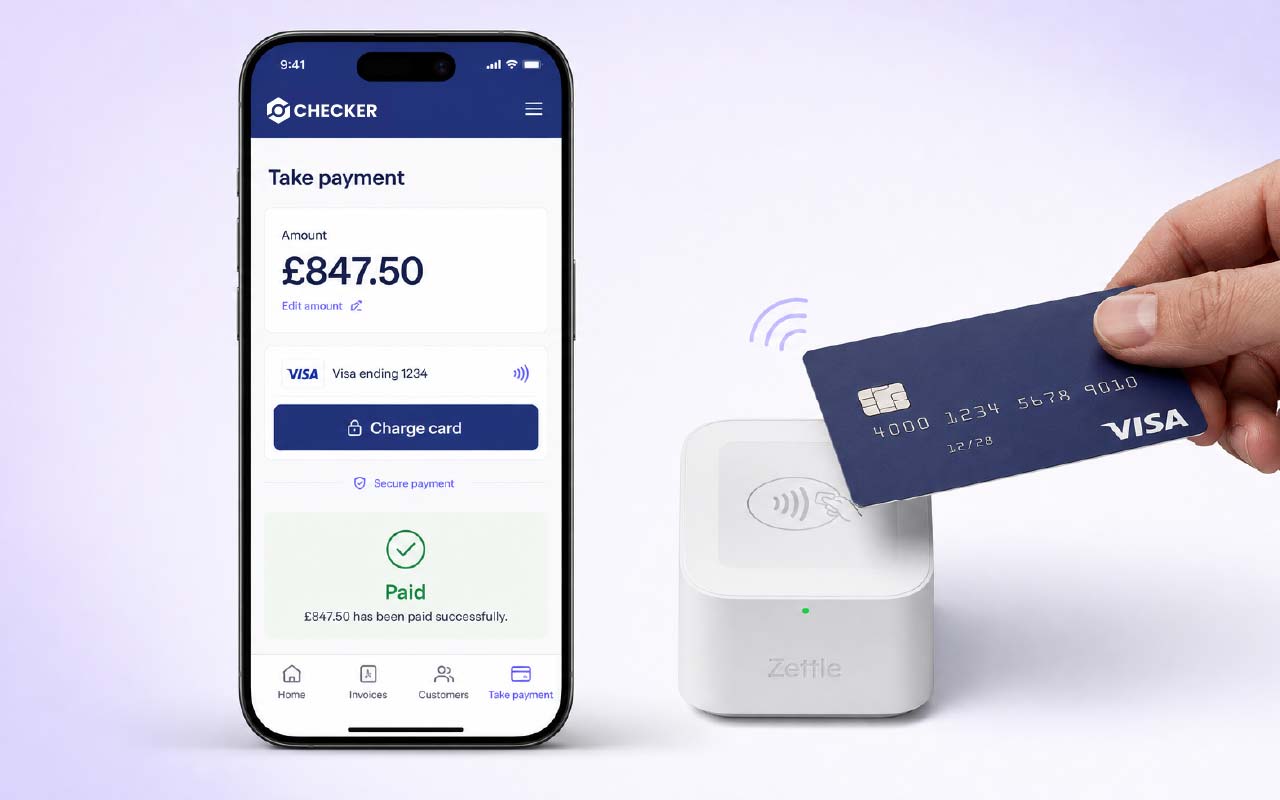
Chasing bank transfers is a mug’s game. The customer means to pay, then the kids come home, then it’s the weekend, and three weeks later you’re sending a polite reminder while paying for the parts on your own card.
Take the card there and then. Checker turns the invoice into a tap on the reader – customer touches their card, phone or watch, the invoice flips to Paid, and the payment reconciles straight into Xero, QuickBooks or Sage. No more “I’ll do it tonight”.
Getting set up
One-off setup. Takes about ten minutes end-to-end, plus however long the reader takes to arrive in the post.
Sign up at zettle.com/gb, create your business account and complete Zettle’s ID verification. It’s a PayPal service, so verification is the standard KYC check – passport or driving licence, and your business bank details.
Pick the reader that suits you from Zettle’s shop – most tradesmen go with the Zettle Reader 2. Have a read of the per-transaction fees on zettle.com/gb/pricing so you know what each payment costs. Checker doesn’t take a cut – fees are billed direct by Zettle.
Finish the job, add labour, parts and VAT, and open the invoice’s payment details page.
First time only, Checker asks you to log in to Zettle and authorise the connection to Checker. One tap, then you’re linked for good.
The Zettle pop-up appears inside Checker. Connect to your reader over Bluetooth – the payment amount from the invoice is already filled in. Hand the reader to the customer to tap, insert or pay with Apple/Google Pay.
The invoice is marked Paid for the amount taken, the customer gets a receipt by email or SMS, and the payment syncs across to Xero, QuickBooks or Sage.
How it works
Raise the invoice in Checker on the driveway – labour, parts, VAT, done in under a minute.
Amount pings straight to the Zettle reader over Bluetooth. Hand it to the customer – chip-and-pin, contactless, Apple Pay or Google Pay.
Receipt goes to the customer by email or SMS. The invoice flips to Paid on the customer record. On to the next job.
Every payment method your customer already uses
The Zettle reader is a proper PCI-compliant terminal – the same tech you tap at Costa. Every major card scheme, every mainstream wallet.
Why engineers switch it on
Waiting 30 days for a bank transfer is what tips small firms into the red. Card on the doorstep is the single biggest cash-flow fix on the van.
No more “I’ll transfer it later”. Card in the reader, done.
Invoice status flips to Paid the moment the reader confirms. No manual reconciling later.
Zettle pays out into your business bank account the next working day – weekends included on business days.
Payment syncs to Xero, QuickBooks or Sage with the invoice reference and fee already reconciled.
Customer gets the receipt by email or text. No paper roll, no printer in the van.
Overcharged or a callback needed? Pull up the payment and refund straight to the same card.
The kit
Checker connects to the Zettle Reader 2 – PayPal’s standard card terminal, the same one you see behind the counter of half the coffee shops in the UK. Rechargeable, pocket-sized, and it lasts a full working day on a charge.
Fees and the reader itself
Zettle bills you directly for the reader and for their per-transaction fee – Checker doesn’t take a cut of your takings. Rates and reader price are on zettle.com. Everything on the Checker side – the pairing, the invoice sync, the accountancy push – is included in your plan.
FAQ
Yes. Sign up at zettle.com, order a Zettle Reader 2, then pair it to Checker from Settings → Payments. Takes about five minutes.
Fees are set by Zettle (PayPal) and charged directly to you, not by Checker. The current rate for UK card present transactions is shown on zettle.com/gb/pricing. There’s no monthly fee – you only pay when you take a payment.
Zettle typically settles the next working day into the business bank account linked to your Zettle account.
Yes. The second the reader confirms the payment, Checker flips the invoice to Paid and stamps the payment against the customer record. If you use accountancy integrations, it syncs the payment across to Xero, QuickBooks or Sage on the two-way sync.
Yes. Enter any amount at “Take payment” – full invoice, part-payment or a deposit against a quote. The balance stays outstanding until you take the next payment.
Open the payment on the customer’s record and hit refund. The money goes back to the same card, and the invoice is updated to reflect the refunded amount.
The reader needs an internet connection (through your phone) to authorise the card. Signal-black cellars and plant rooms are the one place it’ll wait – step outside, take the payment, done.
Card data never touches your phone or Checker. It stays inside the PCI DSS-certified Zettle reader and goes straight to PayPal for authorisation. Checker only sees the confirmation and the amount.
Yes. Sign up and verify at zettle.com/gb first, then link the account inside Checker the first time you tap “Take card payment” on an invoice.
Make sure Bluetooth is on and the reader is charged. If it still won’t connect, sign out and back into Zettle from the Checker payment screen, or contact Zettle support with the reader’s serial number.
Free trial, no card needed. Pair a Zettle reader and get every job paid before you leave the drive.
Start your free trial →Quick question? Mon to Fri, 9am to 5pm.
Chat on WhatsAppGet the app
Rather someone walked you through it? Book 15 minutes.
