Staff Management
Bolt sub users onto your Checker account for £10.99 + VAT each – then decide exactly what they can touch and what stays yours. Every quote and invoice, cert and price list stays on your terms.
Start your free trial →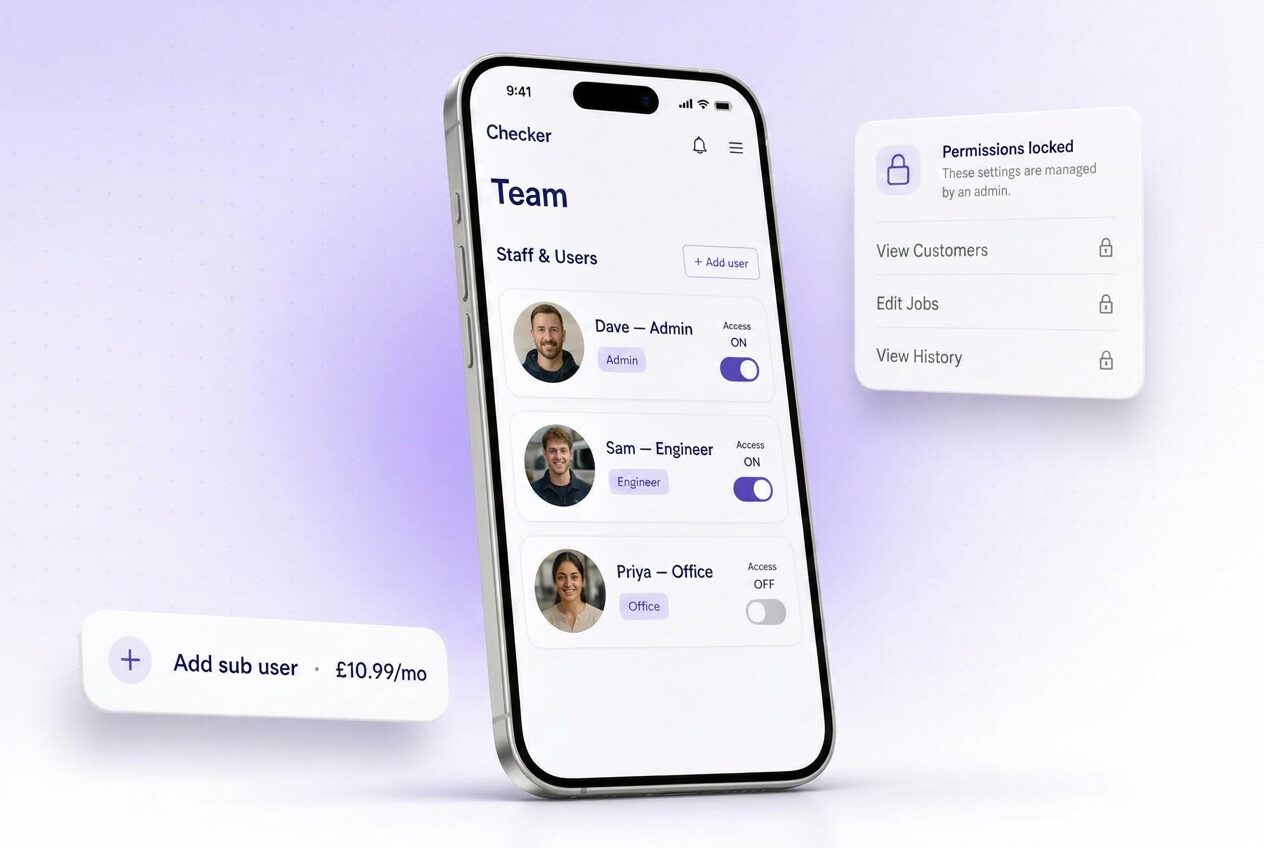
Once you take on your first engineer, apprentice or office lad, life gets complicated fast. Whose van is where. Who invoiced Mrs Jenkins. Who decided a boiler service was “£90 mate, cash” when your price list says £120. Suddenly you’re not a plumber, you’re a manager – and half your working day goes on chasing your own team.
Checker’s staff management is built for that. The master account holder is the admin. Everyone else is a sub user. Sub users get their own login, their own signature, their own diary – but the admin decides what they can see, what they can change, and (crucially) what they can’t.
The headline
Add a sub user in ten seconds. Cancel them just as quick the day they leave. No annual contracts, no minimums, no per-seat gotchas. Billing’s pro-rated to the day.
What sub users get
Every sub user is a real user, not a dressed-up copy of your account. Their name, their signature, their audit trail.
One toggle and an engineer’s access is suspended the day they leave. No password resets, no data loss, no “I’ll get to it Monday”. Their work stays filed to your business.
Sub users send quotes and invoices signed by them – but every bit of paperwork carries the master company brand, VAT number, bank details and payment terms. Consistent every time.
Sub users see the customer database, appliance history and certs they need – nothing more. Landlord margins, supplier cost prices and net profit stay hidden unless you switch them on.
The master account holder freezes the price list, VAT scheme, invoice templates, email footers, cert wording and payment links. Sub users work the company way, full stop.
Why we let admins lock settings down
Most apps hand every user the same set of keys. That’s fine when there’s one of you. It’s a disaster the day you take on your second engineer. Here’s what admin lockdown actually stops.
One rogue engineer changing the invoice footer, swapping the logo, or emailing a customer a hand-typed quote in Notes undoes years of brand work in an afternoon. Locked templates mean every bit of paper leaving your business looks identical – whoever pressed send.
CIS reverse charge, DRC, standard-rated, zero-rated. Get the VAT scheme wrong on one invoice and HMRC don’t care that it was the new lad on his second day. Lockdown means the VAT logic is set once, by the admin, and every sub user follows it whether they realise it or not.
Your price list is your business. When sub users can freely edit prices mid-job “to keep the customer happy”, your margin walks out the door with them. Locked pricing means discounts go through the admin – not the van – and every job comes back at the number you agreed.
Gas Safe cert wording, defect classifications, warning notices – these are legal documents. Lockdown stops sub users editing the templated wording or skipping fields. What leaves the app is what your RGI-approved admin signed off.
What the admin can lock
Unlock any of these per-user if you trust that engineer with them. Default is locked – safer that way.
How the roles work
Right now Checker keeps it simple: one Admin, everyone else is a sub user (engineer). Office staff roles with finer-grained permissions are next on the roadmap.
Admin
Master account holderYou. Everything. Billing, settings, users, price list, VAT, all reports, all margins. Only one admin per account – keeps the buck stopping with you.
Engineer sub user
On the toolsTheir jobs, their forms, their certs, invoices from locked templates only. Sees the customers and jobs assigned to them. No settings, no margins, no other engineers’ work.
Office staff sub user
Bookings, invoicing, customer careA role for the office – raising quotes and invoices, managing the diary, handling customer calls – without engineer field-tool access. In development now; drop us a line if you’d like early access when it lands.
Pricing
Your master Checker plan stays what it is. Each sub user is a bolt-on. Add ten one week, drop three the next – billing catches up automatically.
Getting your team on
FAQ
Toggle their access off. Their login stops working the same second. Every job, cert, invoice and customer note they created stays filed against your business – not their personal phone. Billing for that seat stops on the day.
Admin decides. Default is no – each engineer sees only their own work. Flip a switch and they can see the whole diary, or just their team’s. Useful for office staff, less useful for a lad on his first week.
Yes – that’s the whole point of admin lockdown. Freeze the price list and every quote and invoice a sub user sends uses your rates. If a customer wants a discount, it goes through you, not the van.
Yes, plus VAT. No add-ons, no premium tiers for the sub users. Whatever your master plan includes – unlimited forms, boiler manuals, automations, the CRM – every sub user gets it too.
Same Checker app, own credentials. Whichever engineer downloads it, they log in with the email you invited – and they see your business, with only the permissions you gave them.
One master admin per account, on purpose – keeps billing and lockdown decisions in one pair of hands. Today everyone else is an engineer sub user. A dedicated office-staff role with wider permissions (diary, invoicing, customer care) is coming soon – get in touch if you’d like early access.
Free 30-day trial, no card needed. Add sub users when you’re ready – £10.99 + VAT each, on/off any day.
Start your free trial →Quick question? Mon to Fri, 9am to 5pm.
Chat on WhatsAppGet the app
Rather someone walked you through it? Book 15 minutes.
